Bringing up Chimera Linux on the Milk-V Titan
I’ve been interested in learning more about the risc-v architecture. I don’t have any knowledge on how driving a market for CPUs works. I’ve long assumed if the manufactures can find a way out of ARM licensing fees, they will push the market in that direction.
QEMU supports risc-v cpu emulation, but it’s painfully slow. Being a new-ish architecture, there are few options for hardware. I wanted to compile and run programs at a reasonable speed. I also wanted flexibility in components attached. I purchased the MilkV Titan despite its well documented shortcomings.
The vendor offers operating system images, which I don’t want to use. I don’t know how they have been manipulated and I don’t trust them. The vendor advertises they are planning to upstream support to the Linux kernel this calendar year. Searching the Linux kernel development list, I was happy to find those claims held true. The development is from a company called Ultrarisc. This machine is the UltraRISC DP1000 SoC. There was active movement to upstream support for the machine and device tree.
I’ve been using Chimera Linux lately. Being an ex-everything-must-run-FreeBSD person, the distribution resonated with me and trying it has been on my to-do list for years. My first experience with it was needing to rebuild the installation iso. I received a new work laptop. A fresh hardware model that required a newer kernel to boot. Building an updated install iso was trivial, thanks to the Chimera project’s tooling, similar to Void Linux mklive. After sorting through swapping a few tools that have hard requirements to glibc or horrid ergonomics to work around (flatpak apps that default to sandbox escape, looking at you, Zed) musl, I’ve become fond of the distribution. Knowing how fast it is to rebuild iso’s, I decided to leverage Chimera to boot on the MilkV Titan.
I’ve built installation media for various reasons over the years. In my experience, it’s often a fair amount of toil to get it right. Doing anything by hand is pain. From that perspective, I started by patching mklive to avoid manual steps. I’m sure there is a better way of doing it, but this worked out fine.
A perk of the Titan board is having an usb-c to serial interface, making the debug process much easier. It’s nice to not worry about video support. My first attempt to boot from usb failed with the same error using multiple drives.
ERROR: C40000002:V02010006 I0 93B80004-9FB3-11D4-9A3A-0090273FC14D 86FEE528
XhcCreateTransferTrb: Fail to map Urb->Data.
XhcCreateUrb: XhcCreateTransferTrb Failed, Status = Out of Resources
XhcTransfer[Type=2]: failed to create URB!
I have no experience with the Limine bootloader. I tried grub instead of spending more time figuring out why Limine was failing. I expected to install grub on the Titan anyway. After replacing the install media boot loader, the system booted without issue.
Neither the live or installed system detected the ethernet device. Luckily I have a few old
usb to 10/100 ethernet adapters from previous data center and network kit work. I plugged one
in, saw the kernel report ASIX AX88772B USB 2.0 Ethernet and dhcpcd pulled an address.
Back to sleuthing on lore, I eventually found the series to support the nic The patches have since been merged and will be available in Linux 7.4.
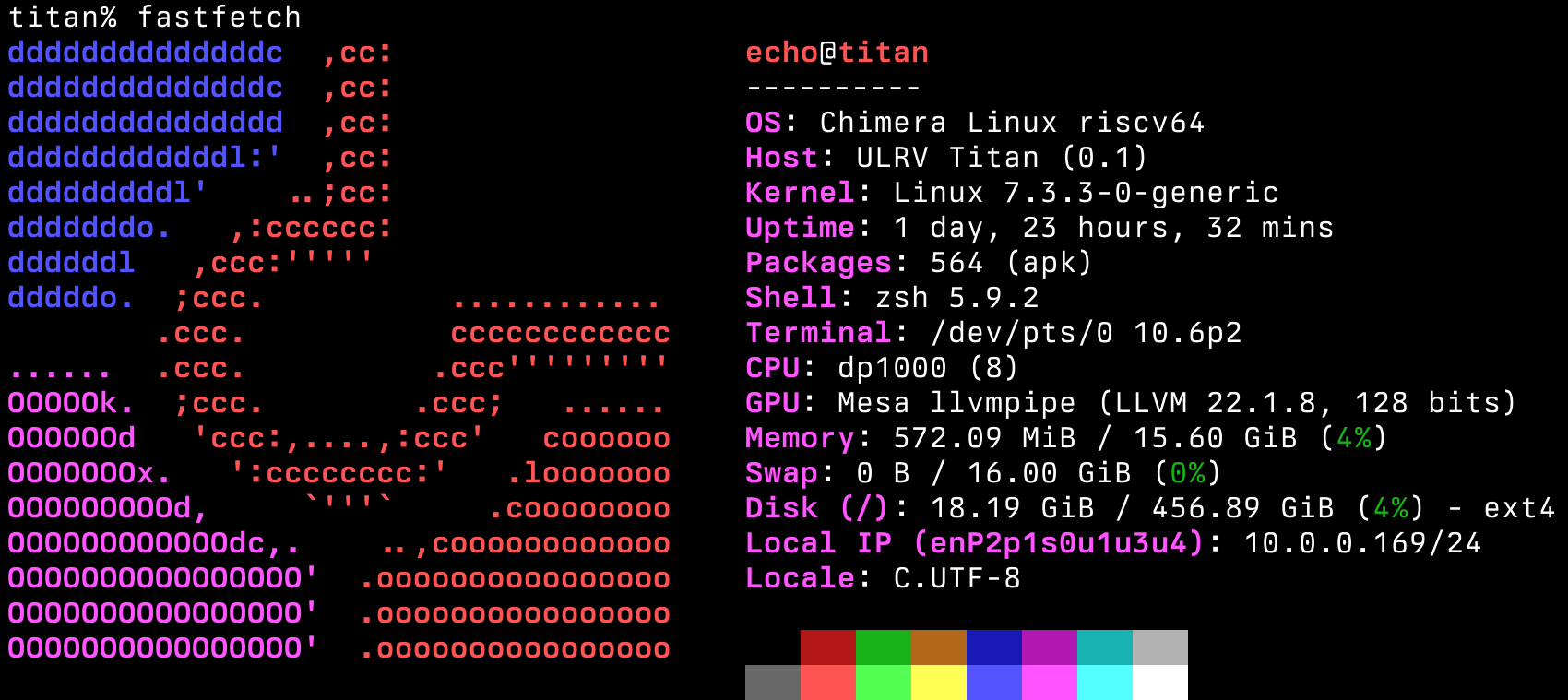
Only one thing left thing to do. Fire up the most excellent syscall.sh site and respect a time honored tradition.
titan% cat hello.s
.section .rodata
msg:
        .ascii  "Hello, world!\n"
        .equ    msglen, . - msg

.text
.globl  _start
_start:
        li      a0, 1
        la      a1, msg
        li      a2, msglen
        li      a7, 64
        ecall

        li      a0, 0
        li      a7, 93
        ecall

titan% clang -nostdlib -static -o hello hello.s
titan% ./hello
Hello, world!
Build Notes
At the time of writing, Linux 7.3.3 was the distributions latest stable kernel. The patch series pulled has since been updated.
Start with installing QEMU riscv64 and update binfmts. Validate riscv64 emulation is enabled:
$ cat /proc/sys/fs/binfmt_misc/qemu-riscv64
enabled
interpreter /usr/bin/qemu-riscv64
flags: POCF
offset 0
magic 7f454c460201010000000000000000000200f300
mask ffffffffffffff00fffffffffffffffffeffffff
Fetch the kernel and device tree patches:
git clone --depth 1 --branch v7.3.3 \
  https://git.kernel.org/pub/scm/linux/kernel/git/stable/linux.git linux-7.3.3
cd linux-7.3.3
b4 am -o - 20261023-ultrarisc-dts-v5-0-af79dbd6ccec@ultrarisc.com | git am
Build the device tree:
make ARCH=riscv defconfig
make ARCH=riscv DTC_FLAGS=-@ ultrarisc/dp1000-milkv-titan.dtb
Fetch Chimera mklive and patch to support persisting the device tree:
cd ..
git clone https://github.com:eholzbach/misc-things.git
git clone https://github.com/chimera-linux/chimera-live.git
cd chimera-live
git checkout ff9a590
git apply ../misc-things/mklive-dtb-option.patch
Build the ISO:
doas MKLIVE_BOOTLOADER=grub ./mklive-image.sh -b base -- -a riscv64 -o titan.iso \
  -d ../linux-7.3.3/arch/riscv/boot/dts/ultrarisc/dp1000-milkv-titan.dtb \
  -c "earlycon console=tty0 console=ttyS0,115200"
From the UEFI shell, list partitions to find the EFI partition and boot:
map -r
FS0:
\EFI\BOOT\BOOTRISCV64.EFI